

What Are .atom URLs in Shopify?
Shopify automatically creates feed URLs that end with .atom.
Example:
/collections/sample-collection.atom
These URLs:
- Are system-generated by Shopify
- Are not real pages for users
- Are not meant to rank on Google
- Exist on almost every Shopify website
Even though customers never visit these URLs, Google can still crawl them.
Where Do .atom URLs Come From in Shopify?
This is the most common confusion among Shopify store owners.
👉 .atom URLs are generated by Shopify itself.
- They are part of Shopify's core system
- They are not created by SEO apps
- They are not created by themes
- They exist even on a brand-new Shopify store
Some apps may use feeds, but the important thing to understand is:
The .atom URL already exists — apps do not create it.
So yes, this is a generic Shopify issue, not an app-related problem.
Why .atom URLs Are a Generic Shopify SEO Problem
This issue is considered generic because:
- It affects most Shopify stores
- It happens automatically
- It does not depend on apps or custom development
- It exists even on new Shopify websites
If your store has collections or blogs, this issue already exists in your setup.
Why .atom URLs Are Bad for Shopify SEO
When Google crawls .atom URLs, it leads to several SEO problems:
- Crawl budget is wasted on low-value URLs
- Unnecessary URLs appear in Google Search Console
- Less crawl focus on important pages like products and collections
- SEO reports become messy and harder to analyze
This does not break SEO immediately, but over time it weakens your site's overall performance.
The Simple and Safe Solution for Shopify Stores
You don't need to delete anything.
You don't need to install any app.
You simply tell Google not to crawl .atom URLs.
Robots.txt Rule to Use
Add the following rule to your Shopify robots.txt file:
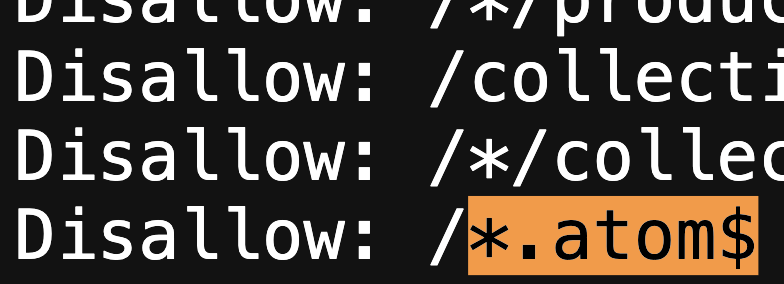
This rule blocks all .atom feed URLs from being crawled by search engines.
Is Blocking .atom URLs Safe for Shopify?
Yes — it is completely safe.
✔ Shopify supports robots.txt customization
✔ Feed functionality continues to work
✔ No impact on users or sales
✔ Improves technical SEO hygiene
This is a recommended best practice, not a risky change.
How Blocking .atom URLs Helps SEO Long-Term
Blocking low-value URLs helps Google:
- Focus on important pages
- Crawl products and collections faster
- Keep indexing clean
- Improve overall crawl efficiency
Good Shopify SEO is not about creating more pages —
it's about removing distractions for search engines.
Final Thoughts for Shopify Store Owners
Not every URL Shopify creates should be crawled by Google.
Blocking .atom URLs is a small technical change, but it results in:
- Cleaner SEO structure
- Better crawl budget usage
- Stronger long-term performance
📊 SEO Keyword Ranking Potential (Keyword Report)
Below are the keywords naturally used in this blog and their ranking potential:
🔹 Primary Keywords
- Shopify robots.txt
- Shopify crawl budget
- Shopify technical SEO
- Shopify feed URLs
🔹 Secondary Keywords
- Shopify atom URLs
- What are atom URLs in Shopify
- Shopify atom feed SEO
🔹 Long-Tail Keywords (Easy to Rank)
- Are atom URLs bad for Shopify SEO
- Should I block atom URLs in Shopify
- How to block atom URLs in Shopify
- Shopify atom URLs indexing issue