












| Client | Mountainside Medical (US, Shopify Plus) |
| Industry | Medical supplies, B2B and B2C |
| What we built | Custom Shopify admin app + license verification workflow |
| Stack | App Home UI Extension, Preact, Shopify Admin GraphQL API, Shopify Flow, Veriflow API |
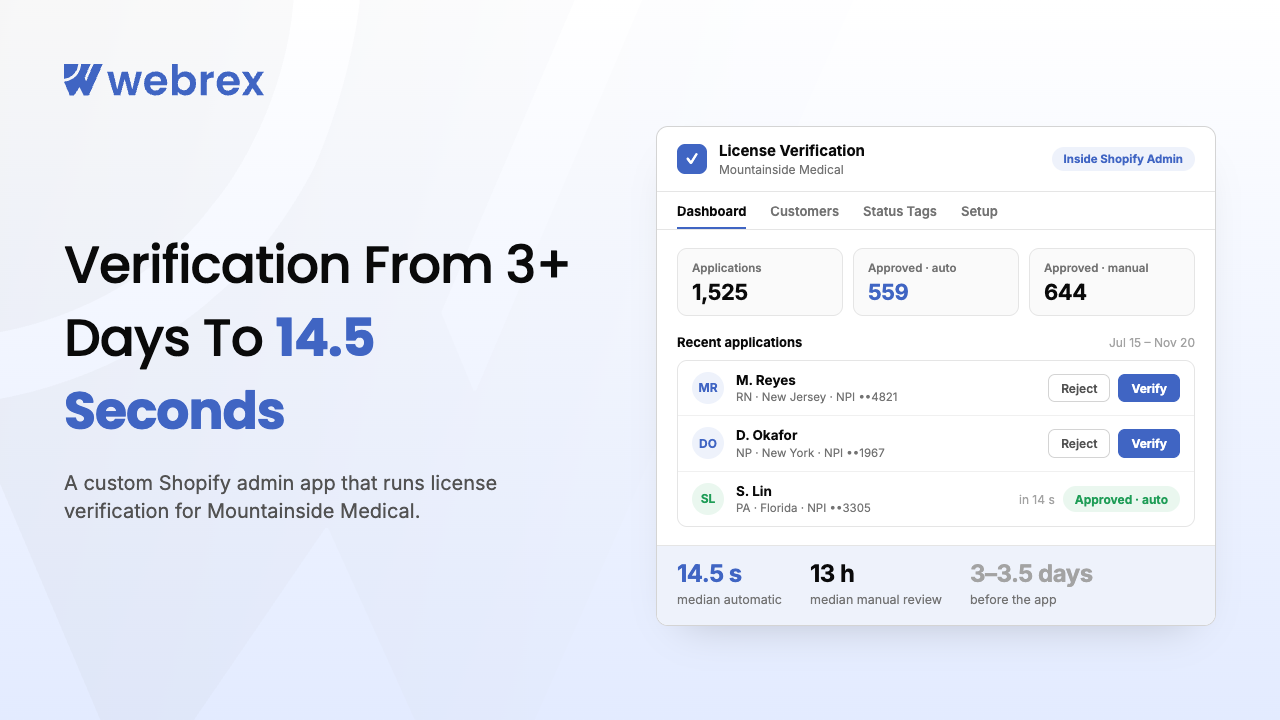
| Headline result | Verification cut from 3 to 3.5 days to a 14.5-second median (automatic) and 13-hour median (manual) |
| Status | Live |
Introduction
Mountainside Medical sells prescription-restricted medical supplies on Shopify Plus. Before someone can buy those products, the store has to confirm they hold a valid professional license.
We had already automated most of that check. A form collects the license details, Shopify Flow sends them to a verification API, and a customer tag records the result. We covered that part in our restricted products verification case study.
Automation only handles the clear cases, though. When the API can't confirm a license, or a document needs a person to read it, the application lands on someone's desk. In plain Shopify Admin, that desk is the customer list.
So the second half of this project was Shopify app development: an admin app where the team can see every application, act on the ones that need a human, and never type a tag by hand again.
Between July 15 and November 20, 2026, the system handled 1,525 applications. A check that used to take 3 to 3.5 days now takes a median of 14.5 seconds when the API can confirm the license, and 13 hours when a person has to review it.
1. Why Shopify Admin Alone Wasn't Enough
Shopify Admin is built around orders and products. It has no concept of a verification queue.
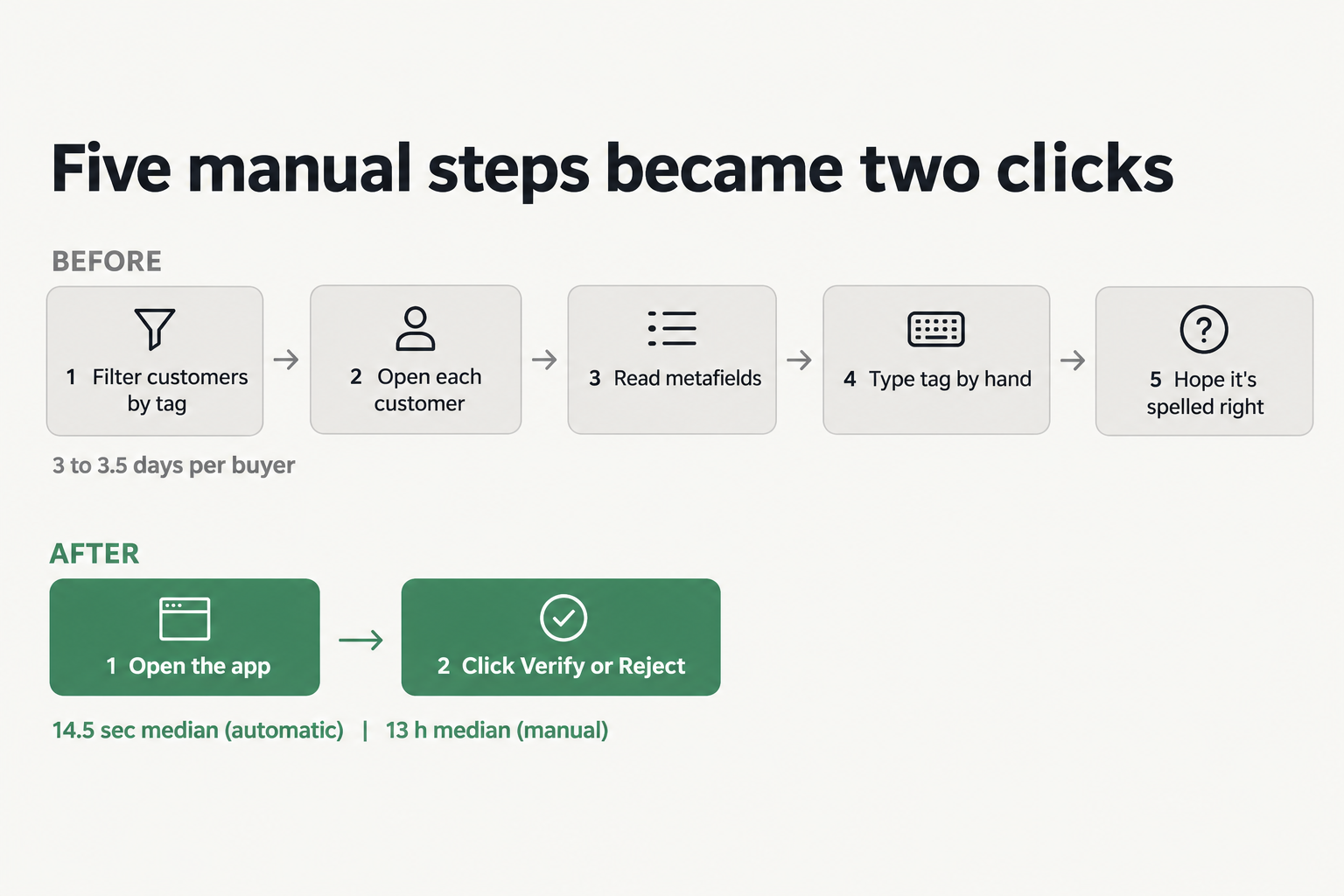
Without an app, the team's process looked like this:
- Filter the customer list by tag to find pending applicants.
- Open each customer and scroll to the metafields for the license number, NPI, and state.
- Approve or reject by editing the customer's tag manually.
Each step works on its own, but together they're slow and easy to get wrong. Verifying one buyer took 3 to 3.5 days. One typo in a tag and a verified buyer stays locked out, and nobody finds out until they email support. There was also no quick way to see how many applications were waiting, or which ones the API had already approved.
2. What the App Had to Do
The brief was simple. Run verification from one screen, inside Shopify.
| Requirement | Why it mattered |
|---|---|
| Show application counts and pending cases | Staff can see their workload before opening anything |
| Show any applicant's license details in one view | No more digging through customer records and metafields |
| Verify and Reject buttons | Manual decisions without editing tags |
| Keep manual and automatic approvals separate | Every approval can be traced to the API or a person |
| Let admins change which tags the app uses | Tag names can change without a code release |
| Use Shopify's own customer data | No second database to sync or secure |
3. Before and After
| Before | After | |
|---|---|---|
| Time to verify a buyer | 3 to 3.5 days | 14.5 seconds automatic, 13 h 10 min manual (medians) |
| Telling the customer | No automatic email | Verification email sent automatically |
| Finding pending applicants | Filter the customer list by tag | Dashboard shows the queue and the count |
| Reading license details | Open each customer, scroll to metafields | License, NPI, state and status on one screen |
| Approving a buyer | Type the approval tag by hand | Click Verify |
| Rejecting a buyer | Type the rejection tag by hand | Click Reject |
| Telling auto from manual approvals | Read tag names carefully | Shown as separate statuses in the app |
| Risk of tag typos | On every manual edit | None, the app writes the tag |
| Seeing total workload | Count it yourself | Dashboard counts it |
| Where staff work | Customer list, metafields and tags | One app inside Shopify Admin |
4. What Happens When an Application Comes In
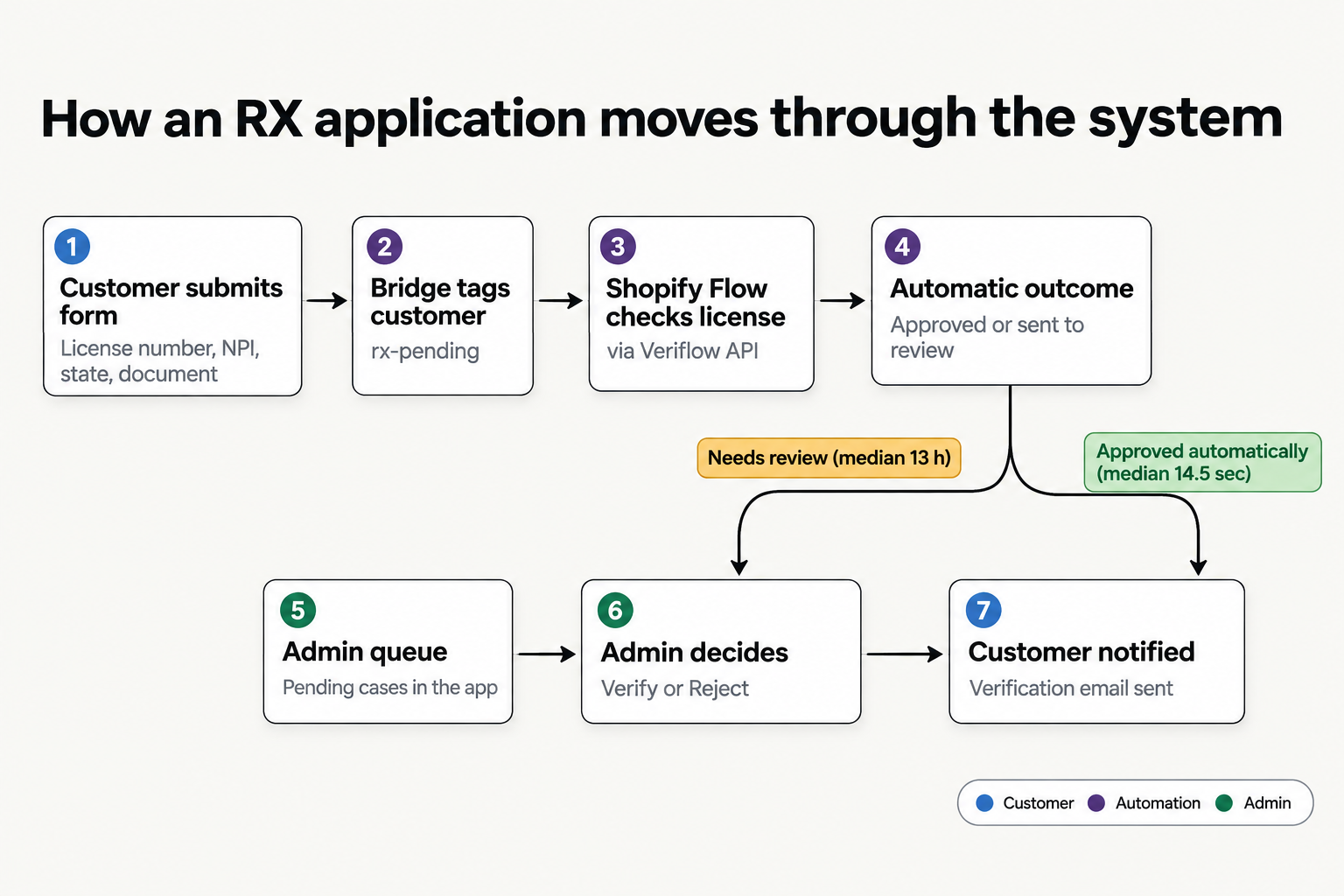
Step 1: Customer Submission
The customer submits their license number, NPI, license state, and a supporting document through a Shopify Forms form.
Step 2: Submission Processing
Our bridge logic picks up the submission and tags the customer as rx-pending.
Step 3: License Check
Shopify Flow sends the license details to the Veriflow API.
Step 4: Automatic Outcome
If Veriflow confirms the license, Flow tags the customer rx-review-approved-auto. If it can't, the customer moves to rx-review-pending.
Step 5: Admin Queue
Pending applicants appear in the admin app.
Step 6: Manual Decision
An admin reviews the case and clicks Verify or Reject.
Step 7: Customer Notified
Every verified customer gets an email confirming they're verified, so they don't have to check back or contact support.
Steps 1 to 4 run with nobody watching. The app exists for steps 5 and 6.
5. What the Admin Team Sees
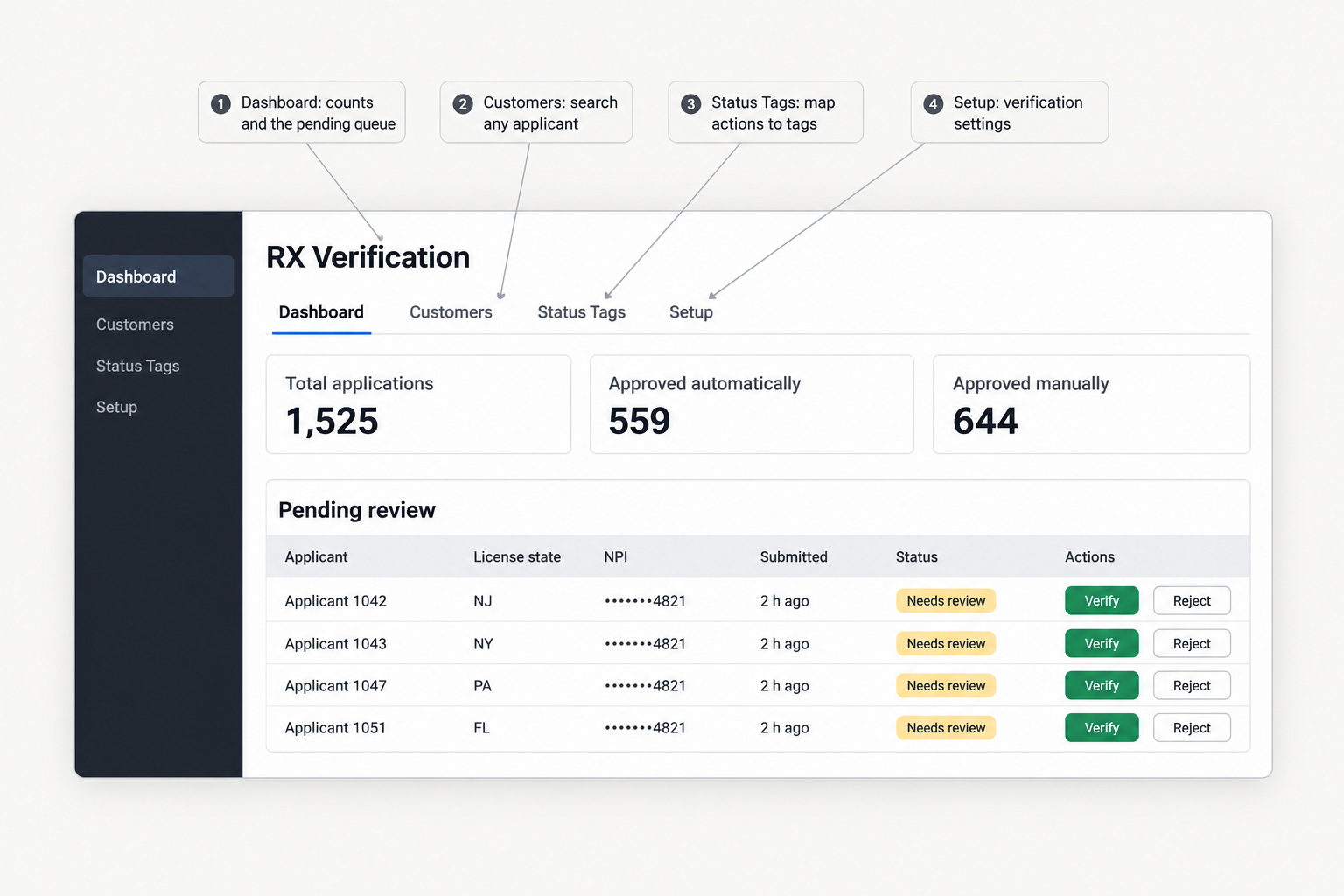
The app has four screens, all inside Shopify Admin.
5.1 Dashboard
Application counts and the pending queue. It answers the first question anyone asks when they log in: how many are waiting?
5.2 Customers
Search any applicant and see their verification details and current status together. There's no need to open customer records one by one.
5.3 Status Tags
This screen controls which customer tag each app action reads and writes. Section 9 explains why that matters.
5.4 Setup
The verification settings live here. Admins rarely touch them, but they know where to find them.
6. Verify, Reject, and Knowing Who Decided
The Verify and Reject buttons are the reason the app exists. An admin opens a pending applicant, checks the license details and the uploaded document, and makes the call.
A manual approval writes a different tag from an automatic one. Veriflow approvals get rx-review-approved-auto. Approvals by a person get rx-review-approved-manually. That sounds like a small detail, but it matters. If the client's compliance team ever asks who approved a buyer, the tag answers it: the API or a person.
The app writes the same tags the automation already listens for, so nothing downstream had to change. Store access, customer emails, and data cleanup on rejection all still run as before.
7. The One Design Decision That Made It All Work
If you hire a Shopify developer to build an admin tool, you'll most likely get an embedded app. That means a web app hosted on your own server, which Shopify loads inside the admin. It also means a server, a database, hosting bills, and someone to call when it goes down.
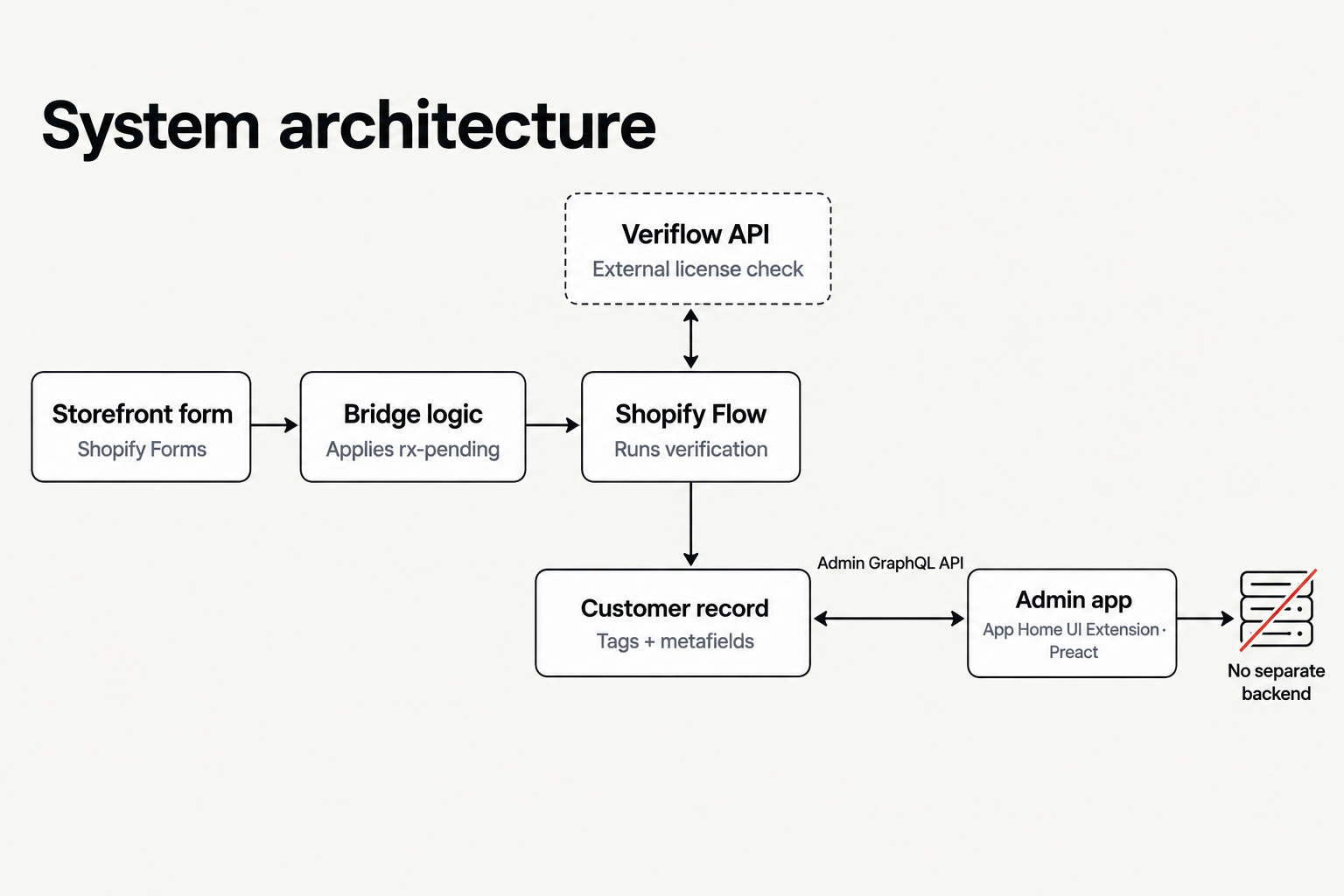
We built this one as an App Home UI Extension instead. The interface is written in Preact and runs in Shopify's own extension runtime. It reads and updates customer records directly through the Shopify Admin GraphQL API.
The dashboard has no server of its own. There's nothing extra to host, patch, or monitor.
| Traditional embedded app | App Home UI Extension (what we built) | |
|---|---|---|
| Where the interface runs | Your own hosted web app | Shopify's extension runtime |
| Server for the dashboard | Required | Not needed |
| Customer data | Often copied into your own database | Stays in Shopify, accessed via Admin GraphQL API |
| Ongoing upkeep | Hosting, uptime, security patches | App updates only |
| Frontend | Usually React | Preact |
For a medical store, this also means one fewer place where license data is stored. Everything stays in Shopify customer tags and metafields.
We'd make the same choice for any internal tool that only needs Shopify data. If an app has to run heavy background jobs or pull in a lot of outside data, a hosted backend still makes sense.
8. Under the Hood: The Technical Architecture
| Layer | What we used | What it does |
|---|---|---|
| Intake | Shopify Forms | Collects license number, NPI, license state, and a document |
| Processing | Custom bridge logic | Receives submissions and applies rx-pending |
| Automation | Shopify Flow | Runs verification and status updates |
| License check | Veriflow API | Validates professional license details |
| Data | Customer tags + customer metafields | Store status and submitted details |
| Admin app | App Home UI Extension, Preact, Shopify CLI | Dashboard, Customers, Status Tags, Setup |
| API | Shopify Admin GraphQL API | Reads customers and updates their records |
9. Status Tags, Decoded
The restricted products case study explains the full tag vocabulary. What's new here is who writes each tag.
| Status | Default tag | Written by |
|---|---|---|
| Submitted | rx-pending |
Bridge logic |
| Needs review | rx-review-pending |
Shopify Flow |
| Approved by API | rx-review-approved-auto |
Shopify Flow |
| Approved by admin | rx-review-approved-manually |
Admin app (Verify) |
| Rejected | rx-review-rejected |
Admin app (Reject) |
None of these tag names are hardcoded in the app. Admins can remap them on the Status Tags screen. If the client renames a tag next year, they change one setting instead of waiting on us for a new release. Flow needs the same edit, but that's a change in Flow, not in code.
10. Results & Impact
We pulled the store's records from July 15 to November 20, 2026. In that period, Mountainside Medical received 1,525 RX form submissions, linked to 1,460 customers.
| Case-study metric | Verified result |
|---|---|
| Recorded RX form submissions | 1,525 |
| Automatic share of known approval methods | 46.5% |
| Median automatic verification interval | 14.5 seconds |
| Automatic verifications recorded within 26 seconds | 90% of the timing sample |
| Manual verifications recorded within 24 hours | 76.8% of the timing sample |
Verification went from days to seconds. Before this system, verifying a buyer took 3 to 3.5 days. When Veriflow can confirm the license, the median time from submission to verification is now 14.5 seconds, and 90% finish within 26 seconds. That's based on 452 automatically approved customers with usable timestamps.
Manual reviews now take hours, not days. The median for a manual review is 13 hours 10 minutes, and 76.8% are done within 24 hours. That's based on 630 manually approved customers with usable timestamps.
More than half of approvals still need a person. Of the 1,203 customers with a recorded approval method, 559 (46.5%) were approved automatically and 644 (53.5%) manually. Automation clears nearly half the queue. The admin app is where the rest gets handled.
Customers hear back without asking. Every verified customer gets an email confirming they're verified, so nobody has to chase support to find out where their application stands.
Other changes the team noticed:
- They review and decide inside one app instead of jumping between the customer list, metafields, and tags.
- Manual and automatic approvals are recorded separately, so every approval traces back to the API or a person.
- Staff no longer type tags by hand, so a typo can't lock out a verified buyer.
- There's no extra server or customer database to maintain, and license data stays in Shopify.
Read what Mountainside Medical said about working with us.
11. What This Means for Your Store
You don't have to sell medical supplies for this to apply. Any store that approves buyers before they can order runs into the same problem. That includes wholesale accounts, Shopify B2B trade buyers, salons buying professional products and licensed contractors. We see it most in the health and medical stores we work with.
| Your situation | Public app from the App Store | Custom Shopify app |
|---|---|---|
| Simple approve or deny, no checks | Usually enough | Overkill |
| Approval needs an outside API (license, tax ID, credit) | Rarely supported | Built around it |
| Your team needs its own review screen | Generic interface | Built for your process |
| Customer data must stay in Shopify | Depends on the app | Your choice |
| Cost | Monthly subscription | One-time build, then upkeep |
Our advice: start with a public app if it does what you need. Go custom when the approval rule is the core of your business, as it is for Mountainside.
If you're not sure which way to go, our Shopify app development team can review your approval flow and tell you. We're a Shopify development agency and Shopify Plus agency with 9 of our own apps live on the Shopify App Store, so we build both kinds.
Frequently Asked Questions
What is a Shopify App Home UI extension?
It is an admin app interface that runs in Shopify's own extension runtime instead of on your server. For Mountainside Medical we wrote it in Preact, and it reads and updates customer records through the Shopify Admin GraphQL API, so there is no separate backend to host or patch.
How fast is automatic license verification on Shopify with this setup?
When the Veriflow API can confirm the license, the median time from submission to verification is 14.5 seconds, and 90% finish within 26 seconds. Manual reviews have a median of 13 hours 10 minutes. Before the system, verification took 3 to 3.5 days.
Should I use a public Shopify app or build a custom one for customer approval?
Start with a public app if a simple approve or deny is enough. Go custom when approval depends on an outside API such as a license, tax ID or credit check, or when your team needs its own review screen.
Where is license data stored in this custom Shopify app?
In Shopify. Status lives in customer tags and the submitted details live in customer metafields. The app has no separate database, so there is one fewer place where license data is kept.
Related Case Studies
- Shopify Restricted Products Verification: part one of this project, the automated Shopify Flow verification system.
- Google Ads Case Study: Medical Supply ROAS
- Ecommerce CRO Checkout Case Study
12. Ready to Build Your Custom Shopify App?
Tell us how you approve customers today. We'll show you what a custom app would change, and whether you need one at all. Book a free strategy call below.