
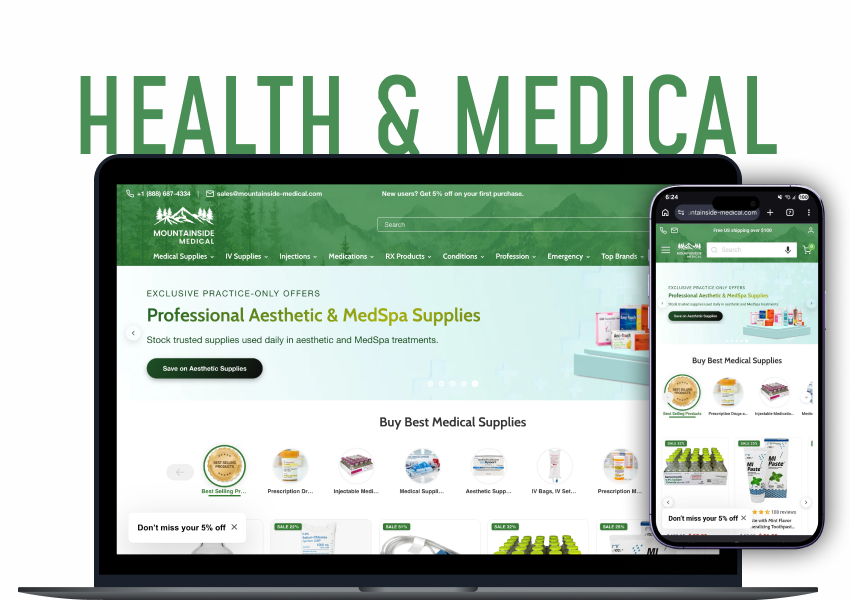







Shopify Can Hide a Product. It Can't Verify the Buyer.
Shopify can hide a product from the wrong visitor. It cannot tell you whether the person trying to buy it is a licensed doctor.
For most stores, that gap never matters. For a store selling surgical instruments, prescription-only diagnostics, or controlled medical supplies, it's the whole business. Sell to the wrong buyer, and you haven't made a bad sale — you've created a compliance event.
Which is why stores selling these products usually end up doing verification by hand: credentials over email, someone checking registries in another tab, someone else updating permissions manually. It works until it doesn't.
This case study documents how Webrex replaced that manual process with a system built on Shopify Flow, customer tags, and customer metafields — one that approves qualified buyers on its own, and only involves a person when the answer genuinely isn't clear.
Why Restricted-Product Stores Can't Just "Hide the Buy Button"
Most stores handle Shopify restricted products the lazy way: a password-protected page, a hidden collection, a "trade customers only" checkbox on a form.
None of that is verification. It's a speed bump. Anyone can tick a box that says "yes, I'm a doctor." Real verification means checking a claim against an external source of truth, for every buyer, in a way you could later defend to an auditor.
The gap between "we hid the product" and "we confirmed this buyer is licensed" is where most restricted-product stores quietly carry risk. It's the same gap behind age verification on Shopify, wholesale-only catalogues, and Shopify B2B stores that gate pricing behind an account.
What Actually Had to Be Verified
For prescription-restricted medical equipment in the US, two things needed to be true about a buyer.
Their medical licence is currently active. Not that they once held one — active, today, in the state they say they practise in.
They don't appear on a federal exclusion list. A government-maintained list of people and organisations barred from federally funded healthcare programmes. On it, and they're ineligible regardless of licence status.
Both are binary facts living in external registries. Neither is a judgement call, which is exactly why they're good candidates for Shopify automation. A human checking a licence number against a registry adds no wisdom to the process — they add latency.
Before and After
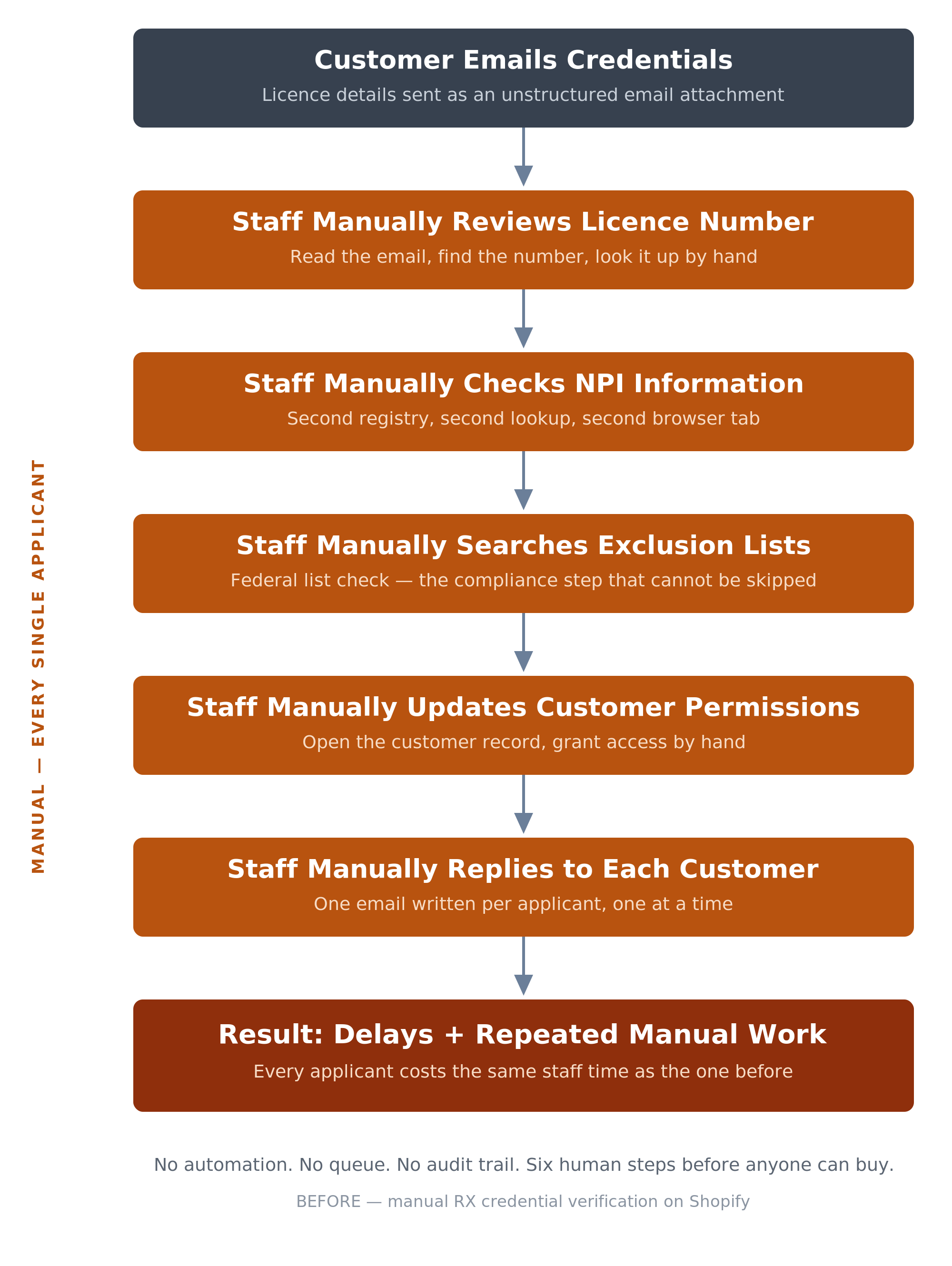
Before: manual restricted-product verification on Shopify
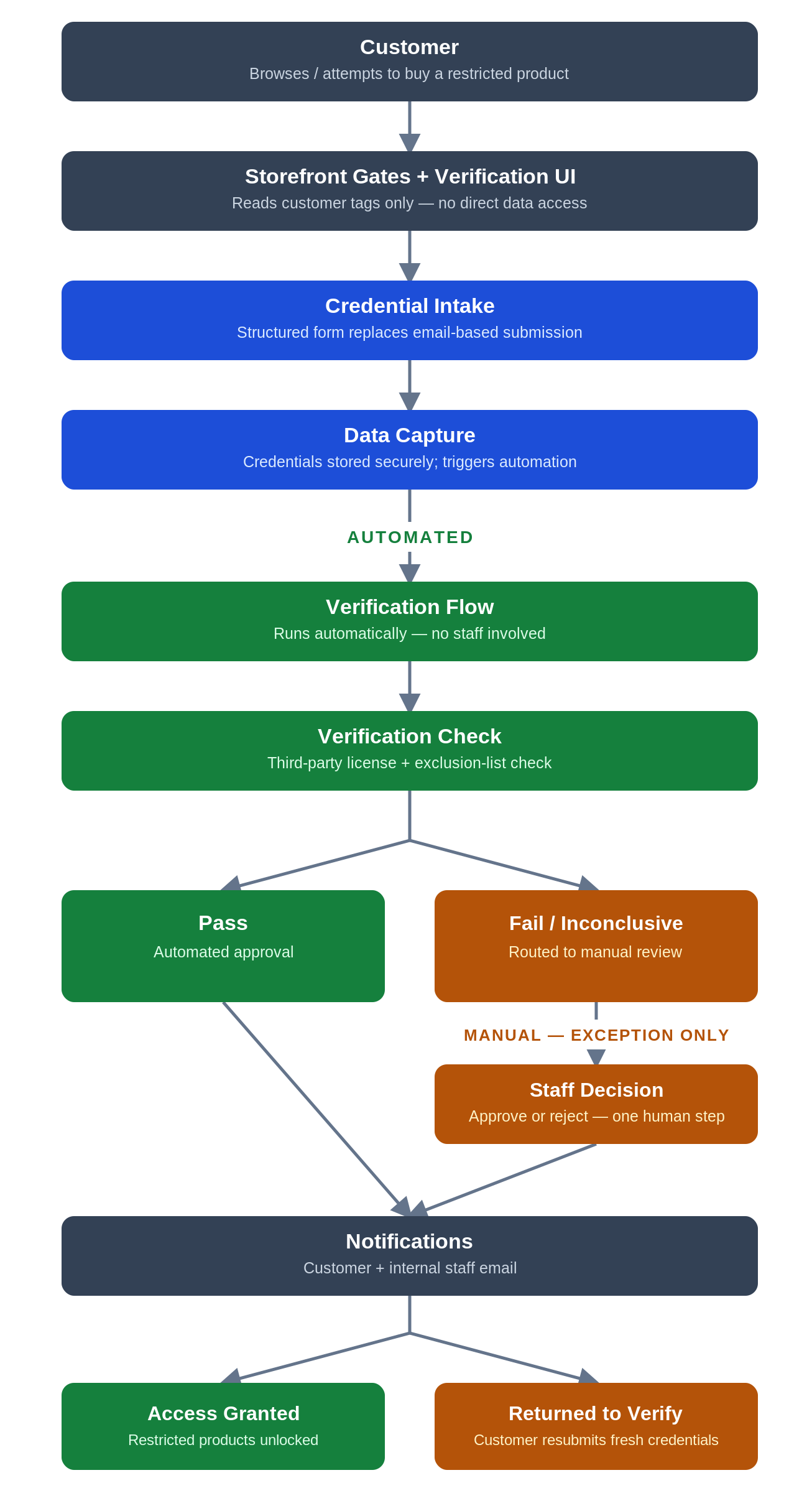
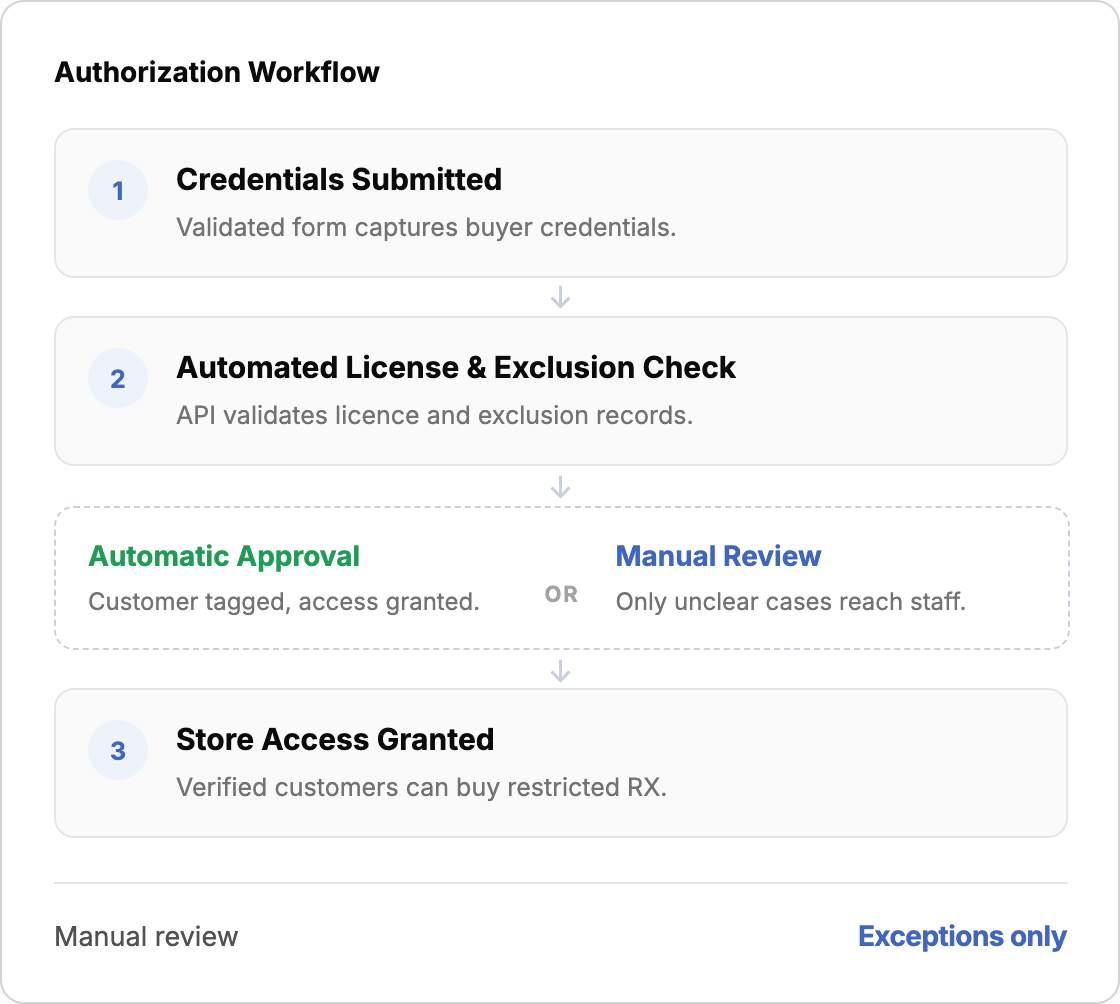
After: automated Shopify Flow verification for restricted products
Read the "after" flow top to bottom, and you'll notice something. From the moment a customer submits their credentials to the moment access is granted or held, nobody touches it. There is exactly one branch where a human appears: when the check returns as fail or inconclusive.
That fallback is deliberate. Automation doesn't get the final word on a rejection. Every application is checked by the API first, and anything the API can't confirm — or actively fails — gets escalated to a person rather than being turned away automatically. No applicant is rejected on a machine's say-so alone, and the ambiguous cases get a second layer of validation instead of a shrug.
That's the difference between "we automated some admin" and "we changed the shape of the work." Staff effort used to scale with total applicants. Now it scales with ambiguous applicants only — a much smaller and slower-growing number.
What Happens When Someone Clicks "Add to Cart"
Most stores would just grey out the button. This system doesn't. The button stays live, and the click is caught and held for a split second while the store checks whether this customer is approved.
What happens next depends on who they are:
- Approved? The click is released, and the product drops into the cart as normal. They notice nothing.
- Logged out? They're asked to sign in first, because there's no Shopify customer account yet to check.
- Not verified? A prompt opens on the spot explaining what's needed, and takes them straight into the form.
- Already applied? They see their current status instead, with no risk of submitting twice.
The point is that the button never just fails. Every click ends in either a product in the cart or a clear next step, which turns a blocked purchase into a started application instead of a lost customer.
What the Customer Sees Everywhere Else
The same principle applies across the store: never let a customer hit a dead end without an explanation and a next step.
A lock indicator on restricted products in collection grids, so a buyer knows a product is gated before they click into it.
A status pill on the product page with four variants, explaining exactly why this product can or can't be bought right now. Not "unavailable." A reason.
A form that validates the name field properly. Real-name validation rejects entries like "Dr. Smith MD," because a name field should contain a name, not a credential. This was the one piece of validation the platform genuinely couldn't do natively, so it was custom built.
A processing screen with live updates. The check is a real network call and isn't instant, so rather than pretend otherwise, the page polls for status, with a timeout state built in.
A path back if rejected, so the customer can resubmit fresh credentials rather than being locked out permanently.
Status Tracking, Notifications, and One Place for the Data
Two changes in this build did more for day-to-day sanity than anything else.
Customers can track their application from the site, and get emailed at every stage.
Previously there was neither. A customer sent an email and then existed in a vacuum until someone replied — no status page, no confirmation, no indication that anything was happening.
Now the application has visible states, and the customer can see which one they're in without contacting anyone: submitted, under automated review, escalated to manual review, approved, or rejected. Each transition also fires an email, so they're informed whether or not they should come back and check the site.
The same four states shown to the buyer on the product page, from first visit through to approval.
All submitted data now lives in Shopify metafields, not spreadsheets.
Every credential a customer submits is stored centrally on their customer record as structured customer metafields, rather than sitting in an inbox, an attachment, or a side spreadsheet someone maintains by hand. That gives a single source of truth — one place to look, one place to update, one place to delete from. It also builds in data integrity by construction:
- The metafield definitions enforce the format of licence and NPI values at write time, so malformed data can't get into the record in the first place.
- Because there's exactly one copy, there's no risk of a spreadsheet and an inbox disagreeing about what a customer submitted.
- Every record is timestamped and attached to a real customer object, so the audit trail assembles itself.
- On rejection, deletion is automatic and complete, because there's only one location to clear.
What the Staff See
Before, staff verified licence numbers, checked NPI records, searched exclusion lists, updated permissions, and wrote replies. Five jobs. Now they have one: look at an escalated case and decide approve or reject.
They make that decision by applying a tag. Everything downstream fires from that single action: access is granted, the customer is notified, and on rejection the submitted licence and NPI data is deleted automatically.
That last part deserves attention. Data minimisation is usually something teams intend to do and never get around to. Building it into the rejection path means it happens whether anyone remembers or not.
The One Design Decision That Made It All Work
The storefront and the backend automation share no direct data access. None. The theme never reads licence numbers, NPI records, or verification documents. It reads customer tags. That's the entire integration surface between the two halves of the system.
Think of it like a nightclub. The bouncer doesn't check your birth certificate or run a background check. Someone else did that and handed you a wristband. The bouncer's only job is: wristband, yes or no.
That separation buys two things. The storefront can't be broken by a change to how verification data is stored — move the data, rename a field, swap the vendor, and the theme doesn't care, because it was never looking at the data. And the backend never has to expose sensitive credential data to the storefront layer, which is where client-side code lives and where leaks happen.
Both approval paths, automated and manual, end in granting the same access tag. So the storefront never needs to know how many approval routes exist upstream.
The tag check is enforced at six independent points rather than one: the product page, the sticky buy bar, the collection grid, the cart page, the cart drawer, and the verification page. A single central gate is one bypass away from being no gate at all.
Under the Hood: The Full Technical Architecture
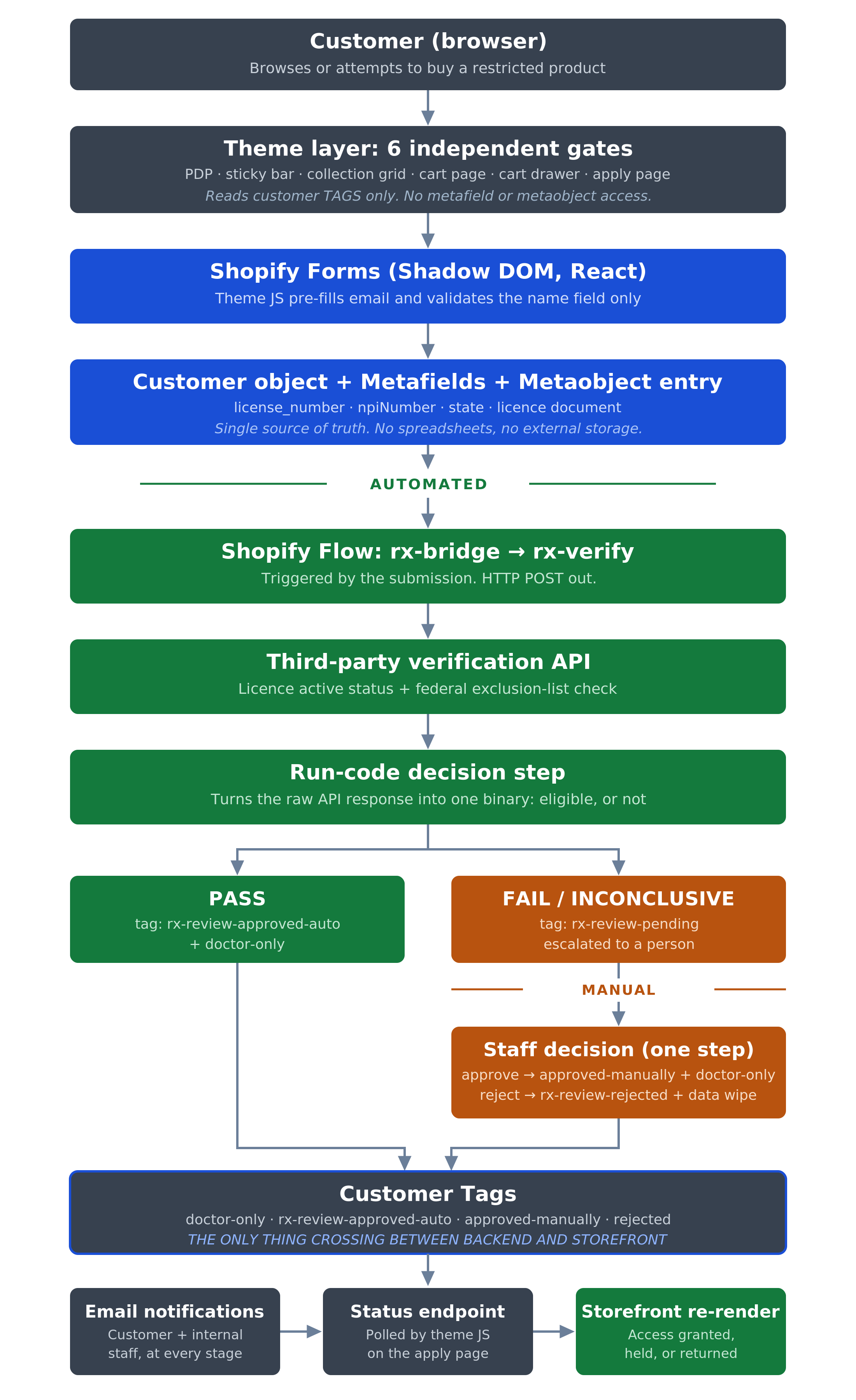
Shopify Flow architecture for restricted-product customer verification
Three things are worth pointing at in that diagram.
The boundary is drawn deliberately low. Everything above the automated line is storefront and data capture; everything below is automation, and the only thing crossing it is a tag.
The decision is a code step, not a person. The API returns a raw result, and a small run-code step turns it into a binary: eligible, or not. The judgement that used to live in a staff member's head now lives written down, testable, and identical every time.
The customer-facing loop closes itself. The status endpoint the theme polls turns an asynchronous backend chain into something that feels, to the buyer, like a form that took a few seconds to submit.
The Shopify Customer Tag Vocabulary, Decoded
Because Shopify customer tags are the entire contract between the two halves of the system, it's worth spelling out what each one actually means. There are six, in three groups.
The shared access flag
doctor-only is the canonical "you may buy this" flag. Applied to products to mark them restricted, and to customers to mark them approved. It's the one tag all six storefront gates check. Both approval paths converge on granting it, which is why the storefront's access logic stays simple no matter which path produced the approval.
The automated path
rx-pending is transitional. Verification is in progress; the API call is in flight. It grants nothing and blocks nothing — its only job is deciding that the customer sees the "processing" screen while a final tag resolves.
rx-review-approved-auto is applied only when the API confirms the licence is active and the applicant isn't excluded. It doesn't grant access by itself — it records how the customer was approved, separately from the access grant, which is what makes the system auditable.
The manual path
rx-review-pending is the escalated equivalent of rx-pending. The automated check couldn't confirm the applicant, and the case is waiting on a human. Again, it only controls which waiting screen shows.
rx-review-approved-manually is applied by staff on approval. On its own, it does nothing to access — it's doctor-only, granted alongside it in the same step, that unlocks purchasing. This tag exists purely to record that a human made the call.
rx-review-rejected is the busiest tag in the set. It triggers deletion of the customer's submitted licence number and NPI, and returns the storefront to its unverified state so they can resubmit.
Read as a group, the pattern is clear: one tag grants access, and the others exist to record how and why. Separating "what happened" from "what it permits" is what turns a permissions system into an audit trail.
Results & Impact
The rebuild changed the shape of the work rather than just speeding up the old process.
- Staff effort now scales with ambiguous applicants only, not total applicants — a much smaller, slower-growing number than the one it replaced.
- "Where is my application?" support tickets stop being written, because customers can see their status on the site and get an email at every stage instead of waiting in silence.
- Credential data lives in one place — Shopify metafields on the customer record — instead of being scattered across inboxes, attachments, and side spreadsheets that inevitably disagree with each other.
- Every application produces a timestamped audit trail automatically, because the record is attached to a real customer object from the moment it's submitted.
- Rejected data is deleted automatically, so data minimisation happens by default instead of depending on someone remembering to do it.
- Access is enforced at six independent points — product page, sticky buy bar, collection grid, cart page, cart drawer, and verification page — so there's no single bypass that opens the whole catalogue.
What This Means for Your Store
You may never verify a medical licence. These ideas still apply to almost any store with rules about who can buy what — whether that's wholesale-only catalogues, Shopify B2B pricing, or age-restricted products.
Let the computer do the boring checks, and save your team for the judgement calls. Look at any approval process you run manually and split it in two: the parts with a definite right answer, and the parts that need a person. Automate the first half completely.
Keep customer data in one place. If the same information lives in an inbox, a spreadsheet, and your admin, all three will eventually disagree, and you won't know which is right.
Tell people what's happening. Most support tickets are just customers asking for information you already have. A visible status and an automatic email at each stage removes the reason to write in at all.
Never let a button silently fail. If a customer can't buy something, say why and say what to do next. A blocked purchase with a clear next step often becomes a sale. A blocked purchase with no explanation is a lost customer.
Delete what you don't need, automatically. If clearing out sensitive data depends on someone remembering to do it, it won't get done. Make the cleanup part of the process, not a task on a list.
Closing Perspective
The engineering value here was never in any one Shopify feature. It was in how the pieces connect: a storefront that enforces access everywhere without touching sensitive data, an automation layer that owns that data and makes the decidable calls, and one narrow handoff between them.
Running a Shopify store with gated products, complex customer permissions, or a manual approval process that's outgrown its inbox? That's the kind of system Webrex builds.