

Shopify localization lets you make one Shopify store feel local to customers in different countries by showing each visitor their currency, their language, and content written the way people there actually read. It works through Shopify Markets: you group countries into "markets," assign each a clear URL like yourstore.com/de-de for Germany or yourstore.com/fr-fr for France, and use Shopify's Translate and Adapt app to serve the right language across the entire shopping journey. Done properly, a shopper in Berlin and a shopper in Paris both land on a store that feels made for them, while you run everything from one admin. This guide shows you how to set up Shopify Markets and localization, where it usually breaks, and how to reach more customers in new countries without building a separate store for each one.
In this guide
- Why most stores stay stuck in one country
- Markets and languages are two different things
- Subfolders vs subdomains vs separate stores
- The backend and storefront are two jobs
- How markets, language and localization fit together
- Will this hurt my Google rankings?
- What a Shopify translation app actually translates
- Common mistakes that break Shopify localization
- A simple plan for setting up Shopify localization
- Frequently asked questions
Now, the picture behind it.
Think about walking into a shop while travelling abroad. The products look good. The prices are fair. But the signs are in a language you only half read, the prices are in a currency you have to convert in your head, and you are never quite sure what you are agreeing to at the till. Most people do not fight through that. They put the item down and walk out.
Your online store does the same thing to foreign visitors every single day, and you never see it happen. Someone in France finds your product, likes it, hits checkout in dollars, reads the English description, and quietly leaves. No error. No complaint. Just a lost sale you never knew was there.
Shopify localization fixes that quiet leak: It makes your store speak the customer's language and show their currency, so buying feels normal instead of risky. This is the Shopify version of ecommerce localization, the practice of adapting an online store to each country you sell in, and it is the whole point of what follows.
This guide walks you through what Shopify localization actually is, how Shopify Markets and languages fit together, how to structure your URLs, and how to translate your storefront so it stays consistent. No jargon, no scare tactics. Just the parts that matter and the traps to avoid.
Why most stores stay stuck in one country
Most Shopify stores start in one country because that is where the founder is. English store, home currency, home shipping. That is the right way to start.
The problem builds slowly. You notice orders trickling in from other countries. You see traffic from Germany or the UAE in your analytics. You think, "I should really do something about that." Then a busy week passes, then a busy month, and the international side of your store stays an afterthought.
The quiet reasons foreign visitors leave
Meanwhile, those foreign visitors keep arriving and keep leaving, and it usually comes down to three things:
- Wrong Currency: They see prices in the wrong currency.
- Language Discrepancy: They read product pages in a language that is not theirs.
- Shipping Issue: They are not sure if you even ship to them.
Each one is a small "no," and small "no" answers do not show up as a problem on any dashboard. They just show up as a conversion rate that is lower than it should be.
The truth is that going international feels like a big project, so owners keep putting it off. But the first version does not have to be big. It has to be clear. And clear starts with understanding one idea most guides skip.
Shopify markets and language settings are two different things
Here is the idea that makes the whole setup click.
A market is a group of countries you treat as one selling region. It controls the commercial side: which currency shows, which countries can check out, and sometimes which prices apply. A Shopify language is simply what words the customer reads. These two feel like the same thing, but they are not, and mixing them up is where most setups go wrong. You manage the second one under Shopify language settings.
You can have one market that speaks several languages, which is what makes a store truly multilingual. Switzerland is the classic example, where the same Shopify market might serve German and French. You can also have one language across several markets, like English serving both the United States and Australia. A country decides the money side. A language decides the words. You set them up separately and then connect them.
The Takeaway: A market controls the money. A language controls the words. Get them clear in your head first, and the rest of the setup stops feeling confusing.
Once you hold those two ideas apart, the Shopify admin makes a lot more sense. Markets live in one place. Languages live in another. Your job is to wire them together so each country sees the right money and the right words at the same time.
Subfolders vs subdomains vs separate stores
When you go international, you have three real ways to structure it, and each has a fair case.
-
Separate stores give you the most control. A separate Shopify store for each country gives you total freedom over design, apps, and content. The honest downside is that it is a lot of work. You are now running two, three, or four businesses. Every change gets made several times. For most store owners, this is overkill and a fast way to burn out your team.
-
Subdomains like
de.yourstore.comare cleaner than separate stores and keep everything under one brand. They work, and some large brands use them. The catch is that search engines treat a subdomain as a somewhat separate site, so the trust and authority your main domain has built up does not flow across as fully as you would like. -
Subfolders like
yourstore.com/de-deare what Shopify Markets is built around, and for most stores they are the right answer. Everything sits under one domain, so the ranking strength of your main site supports every market. You manage it all from one admin, using Shopify's subfolder URL structure. In a recent client build, we kept the main English store on the root domain with no/entag at all, and added German at/de-deand French at/fr-fr. One store, one domain, three local experiences.
For the vast majority of Shopify owners, subfolders under one domain are the simplest setup that still does the job well.
The part nobody talks about: the backend and storefront are two jobs
Most guides make Shopify localization sound like a settings task. Flip on a market in Shopify admin, add a language, done. That is only half the story, and the missing half is where real projects get stuck.
There are actually two sides to this:
- The backend is the configuration inside Shopify admin: your markets, your currencies, your languages, your URL structure.
- The storefront is what the customer actually sees and clicks: your theme, your product pages, your menus, your buttons.
A market can be set up perfectly in the backend and still show a broken experience on the storefront if the theme does not handle the language and market context correctly.
We ran into exactly this on a recent build. The markets were configured, the languages were added, the URLs were right. But a language conversion issue appeared on the customer-facing side once more than one language was served from the same domain. Some parts of the store switched language, and some did not, so a shopper could see a mix. The fix was not in the admin at all. It was in connecting Translate and Adapt properly to the storefront sections so the whole page spoke one language.
The lesson is simple. A market is only "done" when the customer-facing store behaves, not when the admin settings look right. You have to test the real storefront, market by market, not just trust the configuration screen.
How Shopify market, language, and localization actually fit together
Once you know that the backend and the storefront are two jobs, here is how the whole setup comes together in practice, step by step.
1. Market and language structure
The first step is to define the market and language combination for each region. For example: example.com/de-de
- First
de→ German language (Deutsch) - Second
de→ Germany market (Deutschland)
So /de-de represents the German language for the Germany market.
2. Primary and secondary languages
For each market, we configure the required primary and secondary languages. For example:
- Germany → German as the primary language
- English → secondary language, if required
Once configured, Shopify can automatically switch the storefront to the appropriate language based on the customer's market and language settings.
3. Localization
Although Shopify handles the language switching, we still need to make sure the store content is properly localized. This includes:
- Products
- Collections
- Navigation
- Theme content
- SEO content
- Pages and policies
- App content
- Market-specific content
- Images containing text
The goal is to make sure the customer gets a complete and consistent experience in their local language.
4. Multiple markets and languages
When multiple markets and languages are configured, the same localization process needs to be maintained across all of them. For example:
- Germany → German →
/de-de - France → French →
/fr-fr - Spain → Spanish →
/es-es - UK → English →
/en-gb
Shopify can manage the language switching, but new products, pages, theme changes, SEO content, and other updates still need to be properly localized. This keeps everything consistent and intact across all markets and languages.
5. Translate & Adapt + theme customization
We use Shopify Translate & Adapt for the main translation and localization requirements. We use theme customization/variations when a market requires changes beyond translation, such as specific UI, sections, layouts, or functionality. So:
- Translate & Adapt → Language and content localization
- Theme customization → Market-specific UI and functionality
6. Configuration and maintenance
Localization needs to be maintained whenever the store is updated. The basic process is:
New content → Translation → Market mapping → SEO/theme/app check → Quality check

This ensures that changes made to the main store are properly reflected across the relevant markets and languages.
7. Issues that can arise during client setup
Can customers get redirected to the wrong page when switching domains or markets?
Yes. Customers may be redirected to the homepage instead of the corresponding localized page when switching domains or markets.
Do variants stay in sync across markets?
Not always. The selected variant, variant image, and localized text/image may not always stay synchronized across different markets. Here is how we show the right product image by variant and language.
Is existing content available in every language automatically?
No. Some existing theme, app, or custom content may not automatically be available in every configured language.
Does custom theme work need extra attention?
Yes. Custom theme sections may require additional work to support multiple languages and markets correctly.
What about ongoing updates?
They need checking too. New products, content, or theme changes need to be checked and localized across the relevant markets.
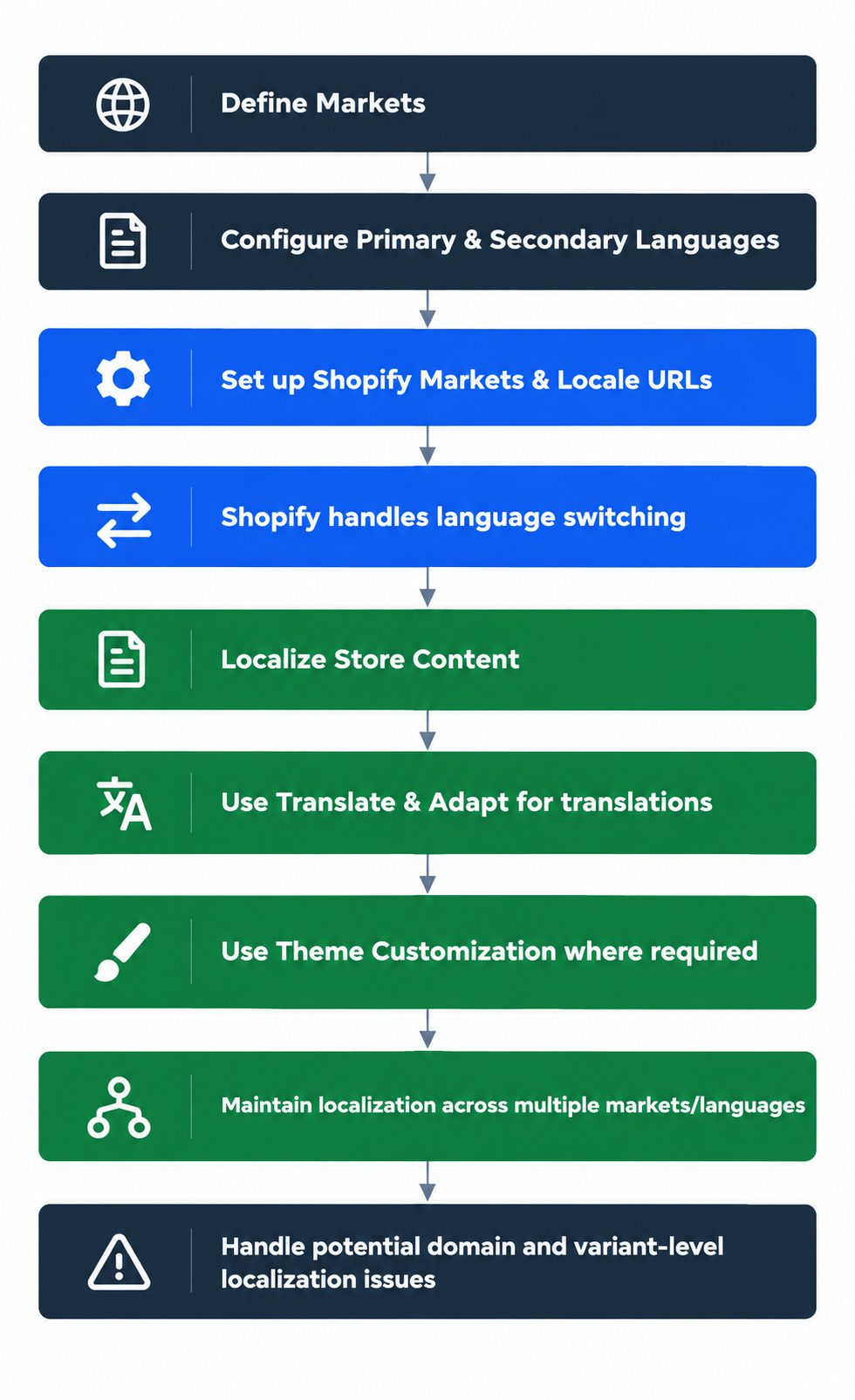
Key Takeaway: Shopify handles the language switching, while our localization setup ensures that the content, URLs, theme, SEO, and variant-level information remain correctly mapped and consistent across every market and language.
Will this hurt my Google rankings?
This is the fear that keeps most owners from starting, so let us answer it head-on.
-
Your existing rankings are not replaced; they are added to. Your English store stays exactly where it is on the root domain. The new markets live on their own paths, so you are adding pages, not overwriting the ones already ranking.
-
Hreflang tags tell Google who each page is for. Shopify adds these tags automatically for your markets and languages. They tell Google "this page is the French one, this is the German one," so Google shows the right version to the right person instead of seeing them as duplicates. Getting the tags, URL structure and indexing right is technical SEO work.
-
One domain keeps your authority together. Because everything sits under your main domain with the subfolder setup, the trust your site has built up supports the new market pages too. You are not starting from zero in each country.
-
Translated pages can rank in local search. A proper German page has a real shot at ranking on Google Germany. That is new organic traffic you did not have before, not a risk to what you already have.
Set up with markets and translation the normal way, going international is far more likely to grow your search traffic than shrink it.
What a Shopify translation app actually translates
A common surprise is realising how much of a store is made of words, and that turning on a Shopify language does not automatically translate all of it. This is where a Shopify translation app earns its place, and here is what it needs to cover so a customer never hits a page in the wrong language.
- Product content: titles, descriptions, and product options.
- Collection content: collection names and descriptions.
- Theme text: buttons, labels, cart text, and the small words baked into your theme like "Add to cart" or "Sold out."
- Navigation: your menus and links.
- Pages and policies: your About, FAQ, shipping, and returns pages.
- Custom sections: any special sections your theme or apps add, which are the ones most often missed.
Shopify's Translate and Adapt is the free translation app built into Shopify, and it handles the bulk of this and can auto-translate as a starting point, which you then refine. There are paid Shopify translation apps too, but Translate and Adapt covers most stores. The mistake is assuming any app covers everything. Custom theme sections and app content are the usual gaps, and they are exactly the parts a customer notices because they sit right in the middle of the page.
Common mistakes that break Shopify localization
These are the ones we see again and again.
-
Treating a language switch as a currency switch. Owners assume adding German also handles the money side. It does not. The market controls currency, and the language controls words, and you have to set both. Miss one, and a customer reads German but pays in dollars.
-
Trusting the admin and skipping the storefront test. The settings look right, so the job feels done. Then a real page shows half-translated content. Always click through the live storefront for each market before you call it finished.
-
Translating the homepage and forgetting the rest. The homepage gets all the attention because it is the first thing you look at. The product pages, cart, and checkout text get missed, and those are where the customer actually decides to buy.
-
Leaving custom sections in English. Auto-translation covers standard content but often skips custom theme sections and app blocks. A shopper then sees a clean German page with one stubborn English block in the middle, which quietly kills trust.
A simple plan for setting up Shopify localization
You do not need to launch every country at once. Add one market, get it right, then repeat. Here is a doable order across two weeks.
Week one: set up the market, language, and URL
Choose the country already sending you the most traffic or orders. Set it up as a market in Shopify admin, turn on its currency, and confirm it can check out. Then add the language for that market and let Shopify build the subfolder path like /de-de, and confirm your English store stays clean on the root domain with no extra tag. One market only.
Week two: translate, refine, and test the real storefront
Run Translate and Adapt to auto-translate as a base, then go through and fix the important pages by hand: your top products, collections, menus, and policies. Do not trust the machine translation blindly on the pages that sell. Then open the live store as a customer in that market and click through the homepage, a collection, a product, the cart, and the checkout. Look for any block still in the wrong language or currency. Fix the gaps, then and only then call the market live.
Once one market runs cleanly end to end, adding the next one is mostly a repeat of the same steps.
Frequently asked questions about Shopify localization
What is ecommerce localization?
Ecommerce localization is adapting your online store to each country you sell in, so shoppers see their own language, their own currency, and content that reads naturally to them. On Shopify, it happens through Shopify Markets and a translation app, so one store can feel local in many countries at once.
How do I add a language to my Shopify store?
Go to Settings, then Languages in your Shopify admin, and add the language you want. Then open the Translate and Adapt app to translate your content into it, and connect that language to the right market so the correct words and currency show together. Your default Shopify language stays on your main store, and each added language gets its own URL path.
Is Shopify multilingual, and how many languages can I add?
Yes, Shopify is multilingual. You can publish up to five languages on the standard plans and up to twenty on Shopify Plus. A multilingual store means the same market can serve more than one language, which matters in countries like Switzerland or Canada where shoppers do not all read the same language.
What is the best Shopify translation app?
For most stores, Shopify's own Translate and Adapt is the best place to start because it is free, built-in, and covers products, collections, and theme text. Paid Shopify translation apps add features like human translation workflows or deeper coverage, but you should only reach for one when Translate and Adapt genuinely falls short for your store.
Does Shopify translate automatically?
Translate and Adapt can auto-translate your content as a starting point, but it does not translate everything, and machine output needs a human check. Auto-translation is a fast first draft. The pages that sell, your top products, collections, and policies, should be reviewed by someone who reads the language.
Will adding languages hurt my SEO?
No, done the normal way, it usually helps. Shopify adds hreflang tags so Google shows the right language version to the right person; everything sits under one domain so your authority stays together, and each translated page can rank in its own local search. You are adding pages, not replacing the ones you already rank for.
Related reading: if you want organic growth beyond going international, see our guide on why category pages are your real SEO growth engine, and catch up on the newest platform changes in Shopify Editions Spring 2026.
Where to go from here
Shopify localization is how you reach customers in new countries without building and running a separate site for each one. The idea is simple: keep your markets and languages clear, put each region on its own clean URL under one domain, translate the whole storefront rather than just the homepage, and always test the real store a customer would see. The trap is treating it as a settings task when it is really two jobs, the backend and the storefront, that have to be checked together.
If you would rather have Shopify Markets and localization set up and tested properly the first time, that is exactly the kind of work we do. Book your free Shopify store audit and see what going international would look like for your store.